Folio
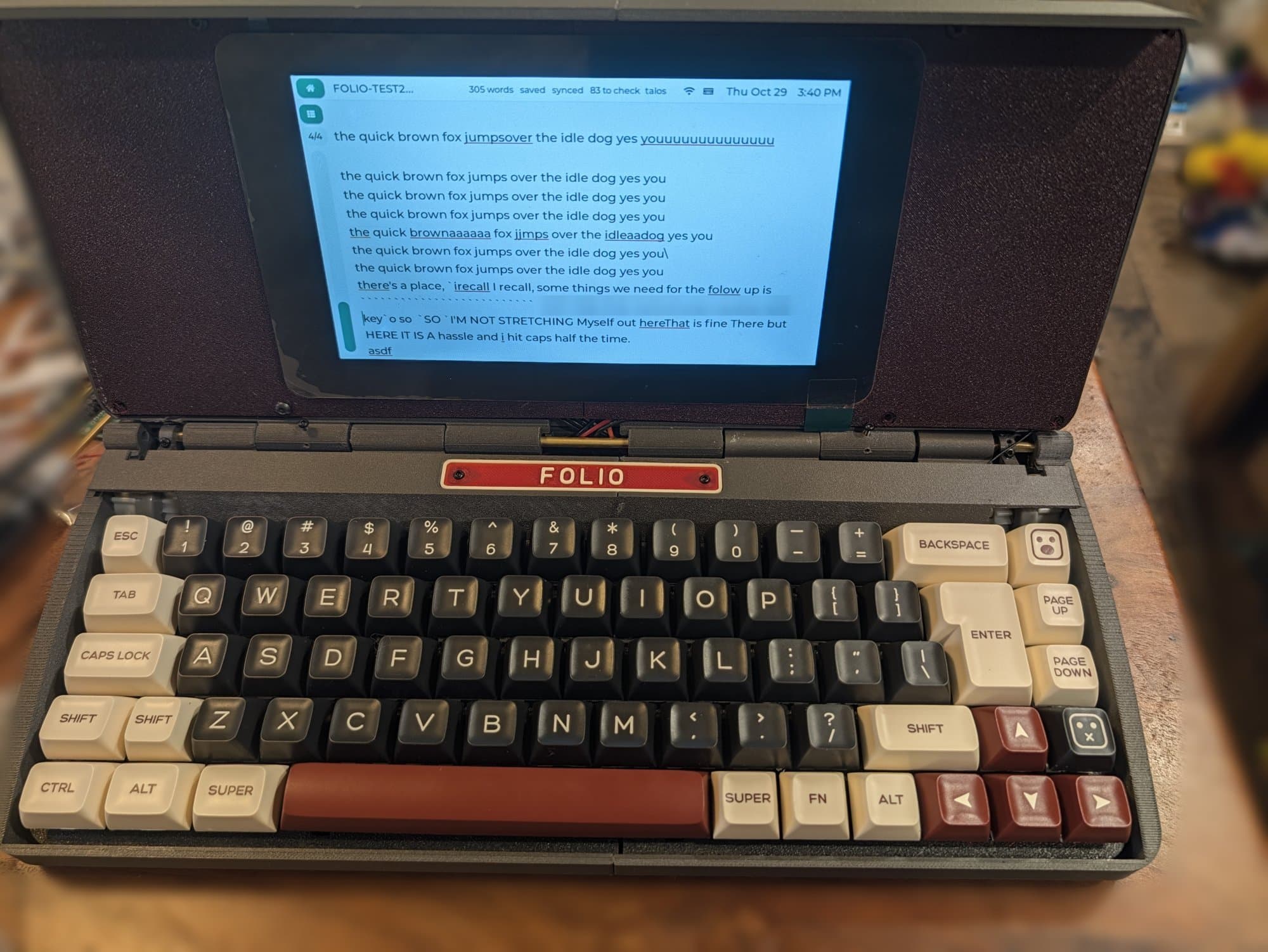
In progressA folding writing machine. A mechanical keyboard in the base, a 7" touchscreen in the lid, and a document that's waiting when you open it. It syncs to Google Docs, and there's no browser to fall into.
Why It Exists
Everything I write for this site gets written on a laptop. The laptop is also where email lives, and the news, and forty agent panes, and every other thing that is more urgent than the paragraph I'm stuck on. The escape hatch is one keystroke away, all the time.
A writerDeck removes the hatch. You open it, the document is there, you type. The idea isn't mine. Un Kyu Lee's Micro Journal is a beautiful open-source take on it, and this project started life under that name. It's grown into its own machine since, so it got its own name.
The E-Ink Detour
The first design was e-ink: a Modos Glider, an open FPGA display controller fast enough to keep up with typing, driven by an Orange Pi. On paper it was the dream. In practice the board, the FPGA and the converters between them barely fit, so it stopped being a compact journal, and the HDMI link flickered in a way I couldn't fix at the source.
So I dropped it. Folio runs a 7" touch LCD now. I gave up the paper feel and sunlight readability on purpose, and got back size, battery life, colour, touch and a picture that doesn't flicker.
Typing Never Touches the Network
Folio is three small computers, and the split is the whole design.
The screen never waits on the Pi, and the Pi never edits text. If the WiFi drops mid-sentence, nothing about writing changes. The sync catches up later.
What's on It
Home is five things: Write, Spotify, Headphones, Calendar and Settings. That's the whole list, on purpose.
Write opens on your documents, each showing where it is on its way to Google Docs. Edits go into the existing Doc in place, so a document stays one Doc wherever it gets edited. Spelling and grammar come from LanguageTool running on the Pi itself, so nothing I write leaves the device to be checked. There's a night mode with every colour's blue pushed down.
Spotify and headphones play from the Pi straight to Bluetooth headphones. Pairing is one tap, any time.
Calendar pulls from Home Assistant, the same calendars Zephyr shows.
The Case
A clamshell that folds closed into one slab, on a brass-rod hinge with geared dampers. The screen sits behind a screwless bezel, the keyboard tilts 3°, the closing magnets are hidden in the walls, and there's a typewriter-style nameplate over the rear deck. The closed top carries raised lines from novels.
Every build of the CAD runs a gate before I see it: every part checked against every other part for overlaps, wall thickness, nothing poking through the skin, the hinge sweep, and the keyboard dropping in. The first case design had parts colliding inside each other while each part checked fine alone. This one can't.
Where It Stands
The electronics are alive on the bench: the screen, the Pi, Docs sync, Spotify and the headphones all work, and the keyboard is in bring-up. The case is on its third revision. After the first fit the whole keyboard dropped 7.3 mm, because the lid stopped short and rested on the back row of keys.
Next is my own keyboard: a 65% board laid out the way I want, with hot-swap sockets and an aluminium plate.